What an AI agent is and how it works
What is an AI agent? How agents work in a loop, their four parts, types, AI agent vs workflow, chatbot and RPA, real examples and when not to use one.

We at Vstorm hear the same question at the start of most projects: what is an AI agent, and does our process need one? An AI agent is software that uses a language model to choose its next step and call tools to carry it out. A workflow follows steps fixed in code; an agent chooses them while it runs.
Today, most companies handle requests that span several systems in one of two ways. A person reads the request, looks things up in three or four systems, and acts. Or a rule-based script repeats the same steps until the input changes and the script breaks.
A common belief says the smarter the model, the better the agent. Our client work points elsewhere. The model is the replaceable part. The tools it may call and the rules around it decide whether the agent works.
How an AI agent works #
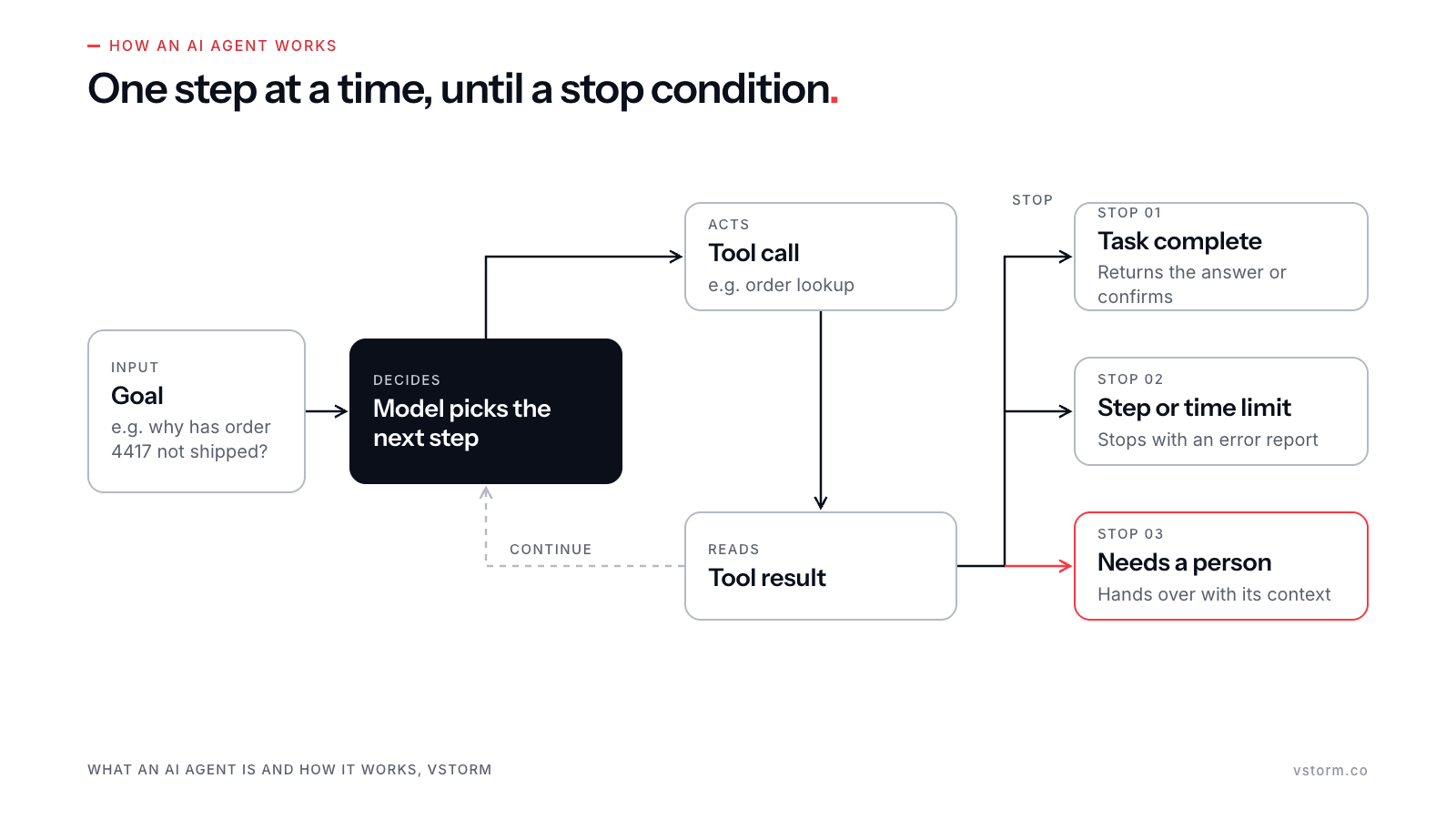
An AI agent works in a loop. A goal arrives, for example: find out why order 4417 has not shipped and tell the customer. The model reads the goal and the context, picks one step, and calls a tool to carry it out, such as an order lookup. The tool returns a result. The model reads it and decides whether to take another step or stop.
Anthropic describes agents as systems in which the model directs its own process and tool use, keeping control over how it completes the task (Building effective agents). That is the core of how AI agents work: the sequence of steps is decided at run time, one step at a time, based on what the last tool returned.
Every loop needs a way to end. We set three stopping conditions:
- The task is complete, and the agent returns its answer or confirms the action.
- The agent reaches a step limit or a time limit, and stops with an error report instead of looping.
- The agent meets a case that needs human intervention, and hands it to a person with the context it has collected.
The third condition matters most in regulated work. An agent that can stop and ask for help can be trusted with more of the routine cases.
Types of AI agents #
The textbook way to sort AI agents comes from Stuart Russell and Peter Norvig’s Artificial Intelligence: A Modern Approach, which groups them by how they decide what to do. IBM’s overview of the types of AI agents lists five:
- Simple reflex agents act on the current input with fixed condition-action rules, as a thermostat does.
- Model-based reflex agents add an internal picture of the world, so they can act on what they cannot observe at the moment.
- Goal-based agents plan a sequence of actions that leads to a stated goal.
- Utility-based agents compare possible outcomes and pick the best trade-off, for example an agent in supply chain management that weighs delivery time against freight cost (see agentic AI in supply chain).
- Learning agents change their behavior based on feedback, so the agent improves over time.
Most agents built on a large language model today combine the goal-based and utility-based patterns: the model plans toward a goal and weighs options at each step. Nobody writes those decisions by hand, which makes the agent flexible. It is also why the control layer in the next section matters. The learning step usually happens through the team’s evaluation cycle, as the questions at the end explain.
The four parts of an AI agent #
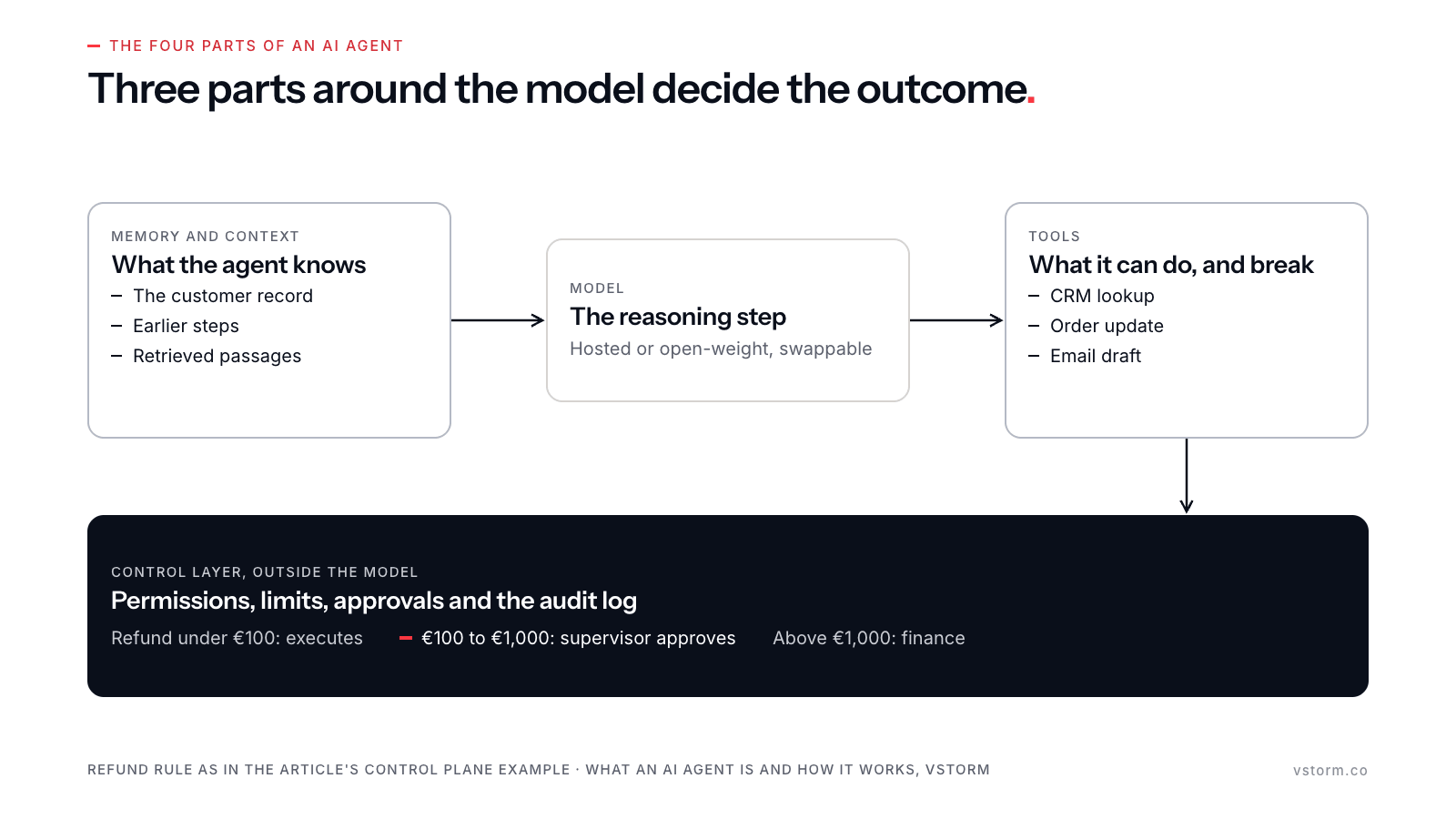
An agent has four parts. Three of them sit around the model, and those three decide most of the outcome.
The model is the reasoning step. It can be a hosted model or an open-weight model on your own servers, and it can be swapped when a better or cheaper one appears.
Tools are the functions the agent may call. In customer service, these are often a CRM lookup, an order update and an email draft. The tool list sets what the agent can do, and therefore what it can break.
Memory and context hold what the agent knows about the task. That includes the customer record, the earlier steps of the conversation, and passages retrieved from company documents in real time.
The control layer sits outside the model. It holds permissions, limits, approvals and the audit log, which together give people oversight of what the agent does. A rule such as “never refund more than €1,000 without approval” is safer in code than in a prompt. In the example from our control plane article, refunds under €100 execute, refunds from €100 to €1,000 need a supervisor, and anything above that goes to finance.
Wojciech Achtelik, AI Tech Lead at Vstorm, explains why the rule belongs outside the model:
“A mitigation asks the model to behave. A boundary does not care whether it does.”
— Wojciech Achtelik, AI Tech Lead, Vstorm
AI agent vs workflow #
Anthropic draws the line clearly. Workflows run language models and tools through code paths written in advance. Agents let the model choose the path. Both can use the same model; the difference is who decides the next step.
The choice should follow the task. When the correct path is known and written down, coding it beats asking the model to find it. Our STCC triage project shows the size of the gap. On an open benchmark of 50 triage scenarios, a raw language model scored 42%. A system that executes the clinical guidelines step by step scored 98%, on par with the 94.4% a panel of nurses reached on the same scenarios. Across 566 scenarios, it reached 96% weighted F1.
An agent earns its place when the path changes with each request and cannot be listed in advance. Many systems combine both: a workflow for the fixed steps and an agent for the open ones. Our guide to single-agent vs multi-agent systems follows the same order: settle how predictable the task is first, then decide how many agents it needs.
AI agents, chatbots and RPA compared #
The three are often sold under one name. They differ in who decides the next step and whether they can act in business systems.
| Question | Chatbot | RPA | AI agent |
|---|---|---|---|
| What it does | Answers questions in a conversation | Repeats fixed clicks and keystrokes in business applications | Completes a task by choosing steps and calling tools |
| Who decides the next step | The user, one message at a time | The script, written in advance | The model, within limits set in code |
| Can it act in business systems | Usually no; it replies with text | Yes, through the user interface | Yes, through the APIs and tools it is allowed to call |
| How it handles messy input | Understands varied wording but cannot act on it | Fails when a field or screen layout changes | Interprets varied input and picks a matching step |
| How it typically fails | Gives a wrong or invented answer | Stops on an unexpected screen | Takes a wrong action or loops without step limits and audit |
The labels matter because they are often misused. Gartner calls the practice “agent washing”: rebranding AI assistants, RPA and chatbots as agents. It estimates that only about 130 of the thousands of agentic AI vendors are real (Gartner, June 25, 2025). The table gives buyers three questions for any vendor: who picks the next step, which systems can the product act in, and what stops it.
AI agent examples from client projects #
The AI agent examples below come from Vstorm projects. Each one starts with how the work was done before the agent.
Print-order configuration at Mixam
Mixam customers configure print orders from more than a billion possible product combinations. Before the agent, customers worked through the options on their own, and staff answered specification questions by hand. Three agents with 15 tools now guide each customer through the order and check every choice. Conversion to a final sale rose from about 20% to about 40%. Workflow results succeed in 95.4% of cases, and more than 96% of web-to-print orders are handled end to end (Mixam case study).
Journalist support at ARIJ Network
ARIJ Network supports investigative journalists across 22 countries. Their questions went to a manual desk that answered them by hand. A bilingual English and Arabic agent inside ARIJ’s Moodle now answers them from ARIJ’s own knowledge base (ARIJ case study).
Workflow building at Synera
Engineers using Synera’s platform built each automation workflow by hand, which could take up to an hour. Our text-to-workflow agent turns a plain-language request into a validated workflow in about two minutes (Synera case study).
How AI agents fail #
In our projects, agents rarely fail because the model is too weak. They fail around it, in four recurring ways.
The first is missing system access. In one project, described in Lesson 3: System access is a hard constraint, an API integration waited nearly two weeks for a VPN connection. Only 20% of the requested documents arrived within two months, and 1,200 ERP records were unlocked near the end of the project. An agent cannot act in a system it cannot reach.
The second is tool chains that break. For a US manufacturer, a function-calling chatbot “could not survive a second tool call.” We rebuilt it as a Pydantic AI agent with a SQL sub-agent and an eight-step graph over 473 database columns, with two bounded retries (hybrid agent-graph case study).
The third is tools as the attack surface. A hidden instruction in an email or a document can steer the model. For agents working on that kind of content, the damage depends on the tools they hold. Simon Willison calls the dangerous combination the lethal trifecta: access to private data, exposure to untrusted content, and a way to send data out. Our prompt injection article draws the practical conclusion: give each agent fewer and narrower tools.
The fourth is retries with side effects. Our control plane article walks through a scenario in which an agent issues a €729 refund, the network drops the response, and the agent retries after a timeout. The customer receives €1,458. A retry is safe only when the control layer knows which actions change money or data.
Outside data points the same way. Gartner expects over 40% of agentic AI projects to be canceled by the end of 2027 because of escalating costs, unclear business value or inadequate risk controls.
When not to use an AI agent #
We at Vstorm build custom agentic AI systems, so we are biased toward them. Even so, many tasks are better served by something simpler:
- A rules engine or a script, when the rule can be written down and rarely changes, such as routing invoices by supplier.
- A single language model call with retrieval, when the task is one question and one answer, such as summarizing a contract clause.
- A workflow, when the steps are known but the input is messy, as in the STCC triage system above.
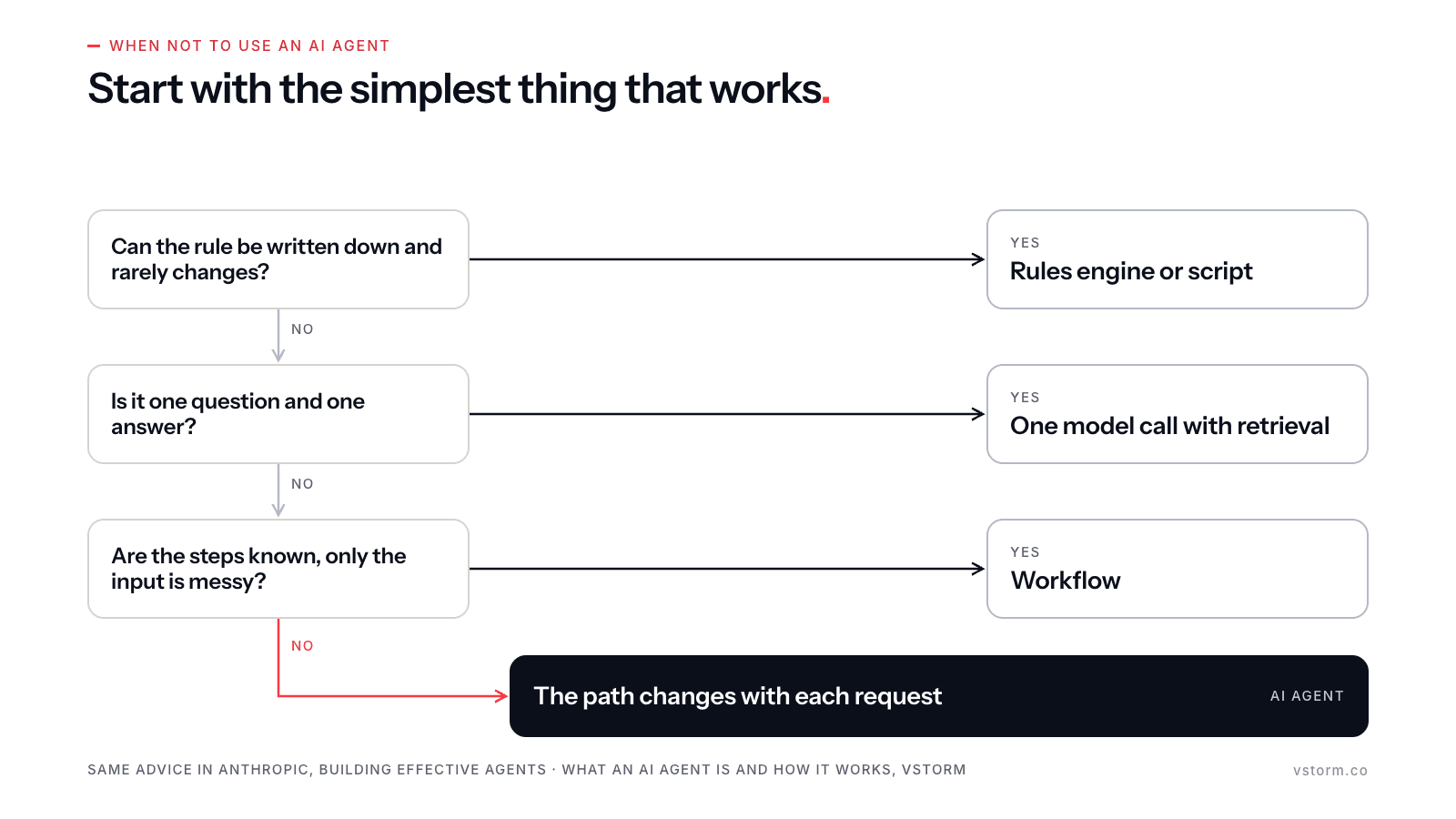
Anthropic gives the same advice: start with the simplest solution, which may mean no agentic system at all. Anushree Verma, Senior Director Analyst at Gartner, said it directly when Gartner published its forecast:
“Many use cases positioned as agentic today don’t require agentic implementations.”
— Anushree Verma, Senior Director Analyst, Gartner, June 25, 2025
How a first AI agent goes live #
A first agent goes live when it is built for one workflow and judged against a number agreed in advance. These are the four steps we follow with clients when deploying AI agents:
- Pick one workflow and agree the success threshold before the build, for example the share of requests resolved without a person or a customer experience score.
- Run a Proof of Value on real data with an evaluation set. It ends in a go or no-go decision against that threshold.
- Put system access and its owners on the critical path from day one. The VPN delay in Lesson 3 shows what a late connection costs.
- Hand over the code, prompts, evaluations and runbooks, so the client’s team can run and change the agent without us.
These steps are the core of TriStorm, our method for agentic AI projects: Strategize, Build, Transform. Our AI agent development team delivers it, and the people who design the workflow are the ones who build it.
Questions about AI agents #
These questions usually follow “what is an AI agent” in our first calls with clients.
Is ChatGPT an AI agent?
In plain chat, ChatGPT is an assistant: it answers, and you decide the next step. Some modes of ChatGPT and similar assistants can browse, run code or use connected tools to finish a task. In those modes they work as agents, because the model chooses the steps.
Do AI agents learn on their own?
In most systems in use today, they do not. The model does not retrain itself during use. An agent improves when its team updates prompts, tools and context based on evaluation results and human corrections.
What is the difference between an AI agent and agentic AI?
An AI agent is one piece of software. Agentic AI describes the wider approach: systems in which models choose steps and act, through one agent or several. Our agentic AI hub covers it in more depth.
Can an AI agent run on our own infrastructure?
Yes, scoped per project. Open-weight models can run on your servers or in your private cloud, and the tools and control layer can run there too. This matters when data cannot leave your environment. AgenticOS, the layer we build client systems on, supports self-hosted models.
How many tools should one agent have?
As few as the task needs. Each tool adds a decision the model can get wrong and an action an attacker can misuse. When the list grows long, we split the work across agents with narrow tool sets, as in the Mixam system, where three agents share 15 tools.