Back to blog
From Single Agent to Hybrid Agent-Graph Architecture: Our Journey with PydanticAI and Text To SQL


When a manufacturing client approached us with a simple chatbot proof of concept, they had no idea their project would evolve into a sophisticated multi-agent orchestration system. Their journey from a single OpenAI API call to a hybrid agent-graph architecture with hierarchical delegation reveals the real challenges of building production-grade AI agents and solutions that actually work.
For the client company in question, it meant an evolution from a failing single-agent system limited to one tool call per query, through a PydanticAI agent with parallel tool execution, to a hybrid architecture combining agents and graphs. You will learn when each pattern makes sense, the specific production metrics that drove our decisions, and the “agent-as-tool” pattern that made complex workflows manageable. Most importantly, you will get a grasp of the signals which can be used to understand when it is time to graduate from simple agents to more complexly orchestrated systems.
The journey from a single OpenAI function-calling agent to a sophisticated pydantic-graph orchestration system taught us that there is no one-size-fits-all solution in agentic AI. The right architecture depends on your specific requirements.
The client, who started with a failing proof of concept, now has a production system handling thousands of queries each day. Their manufacturing team now gets instant answers to complex questions about orders, inventory, and customers. The system scales as their business grows and new features take days to implement, not months.
Vector search and retrieval-augmented generation have emerged as critical AI workflow tools to make business data more structured and address (and amend) the disconnect between enterprise models and execution.
- Bianca Lewis, executive director of the OpenSearch Software Foundation, October 3 2025, on How RAG continues to ‘tailor’ well-suited AI
The challenge: when simple AI Agents hit their limits
Our client, a manufacturing company with a complex MySQL database containing customer orders, products, and manufacturing data, came to us in frustration. They had built a proof of concept using OpenAI’s API with function calling, but it consistently failed to meet their expectations.
The original setup was straightforward: a single prompt, connected to OpenAI’s GPT model, with a handful of tools the agent could call. On paper, it looked elegant. In practice, it was a disaster.
The mess in the code
The fundamental problem: The client’s codebase was poorly structured and implementation errors prevented the agent from executing multiple tool calls effectively.
The existing code was a tangled mess of dependencies and unclear control flow. Critical implementation bugs meant that after the agent executed an initial tool call, the system failed to properly re-engage the LLM with the tool-calling capabilities.
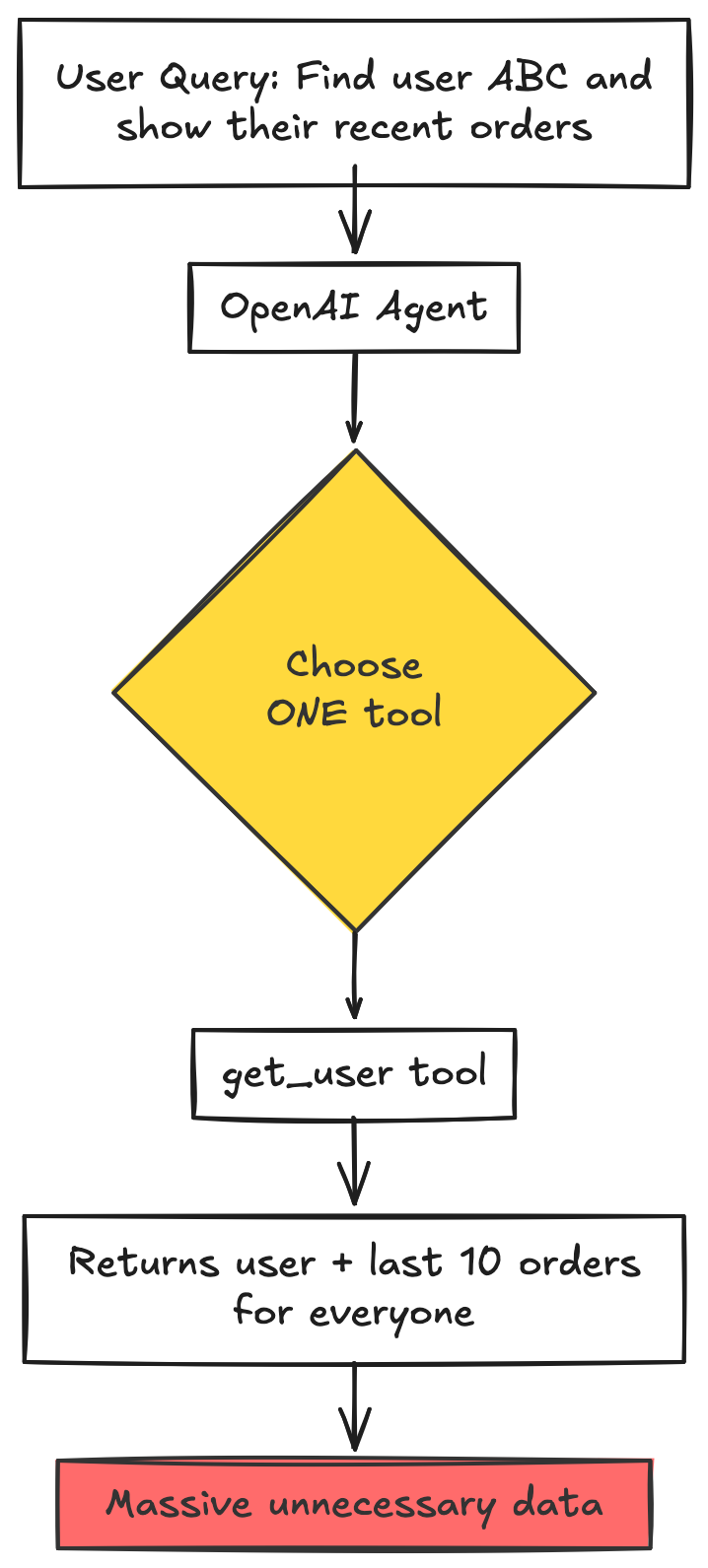
This implementation failure cascaded into a nightmare of workarounds. When a user asked “Find me user XYZ and give me their latest order,” the system could not handle the multi-step reasoning required. The broken architecture forced every query into a single, monolithic operation.
The client’s attempted solution? To create increasingly complex, sprawling tools that tried to do everything at once. They built a “get_user” function that also fetched the last 10 orders for every user, even when orders were not needed. They created tools that joined multiple tables, performed complex aggregations, and returned massive datasets, all just to compensate for their broken implementation that could not properly orchestrate multiple tool calls.
This approach had predictable consequences:
- Tool functions became thousands of lines long
- Performance degraded as every query fetched unnecessary data
- Adding new features required the modification of existing, fragile tools
- Error handling became impossible to manage
- The codebase turned into unmaintainable spaghetti
Our work
The Vstorm team decided to take a vastly different approach and fix the root cause of the problem bydelivering a new, custom tailored solution.
Understanding the client’s pain points
During our initial analysis, we identified three critical issues that made the existing system unworkable:
- The Broken Tool Orchestration
Every realistic business query requires multiple steps with sequential reasoning. “What’s the status of my order?” needs to look up the customer, find their orders, check shipment tracking, and potentially fetch contact information. The client’s codebase had critical bugs in how it managed the agent’s conversation loop: after executing initial tools, the system failed to properly pass tool definitions back to the LLM. This was not an inherent limitation of the AI agent, but a direct consequence of messy, unmaintainable code that failed to implement proper agent orchestration patterns. The broken implementation forced developers to either build monolithic tools that anticipated every possible need upfront or to accept incomplete answers.
2. The Database Complexity Trap
The client’s MySQL database had dozens of tables with complex relationships. Creating generic tools to cover every possible use case was not just difficult, it was mathematically impossible. The combinatorial explosion of potential queries vastly exceeded what could be reasonably handled if implemented as individual tools.
3. The Maintenance Nightmare
As business requirements evolved, every change to the database schema or business logic required the updating of multiple sprawling tools. The simple addition of a new field meant hunting through thousands of lines of code to find every place that tool was used to ensure consistency.
The client knew they needed a different approach, but was not sure what it may look like. They needed agents that could think in multiple steps, access flexible data retrieval, and integrate with their existing systems without requiring a complete rewrite every time something was changed.
Redesigning the system: PydanticAI Agent with SQL Sub-agent
After analyzing the client’s codebase and requirements, we proposed a fundamental architectural shift: move from OpenAI’s basic function calling to PydanticAI, a production-grade agent framework, and introduce the concept of a specialized SQL sub-agent.
The core improvement: Agent Delegation
Instead of trying to build a single agent that could do everything, we created a two-tier architecture:
- A Main Agent with specific, well-defined tools for common operations (customer lookup, order retrieval, contact information)
- A SQL Subagent capable of translating natural language into SQL and executing custom queries for edge cases
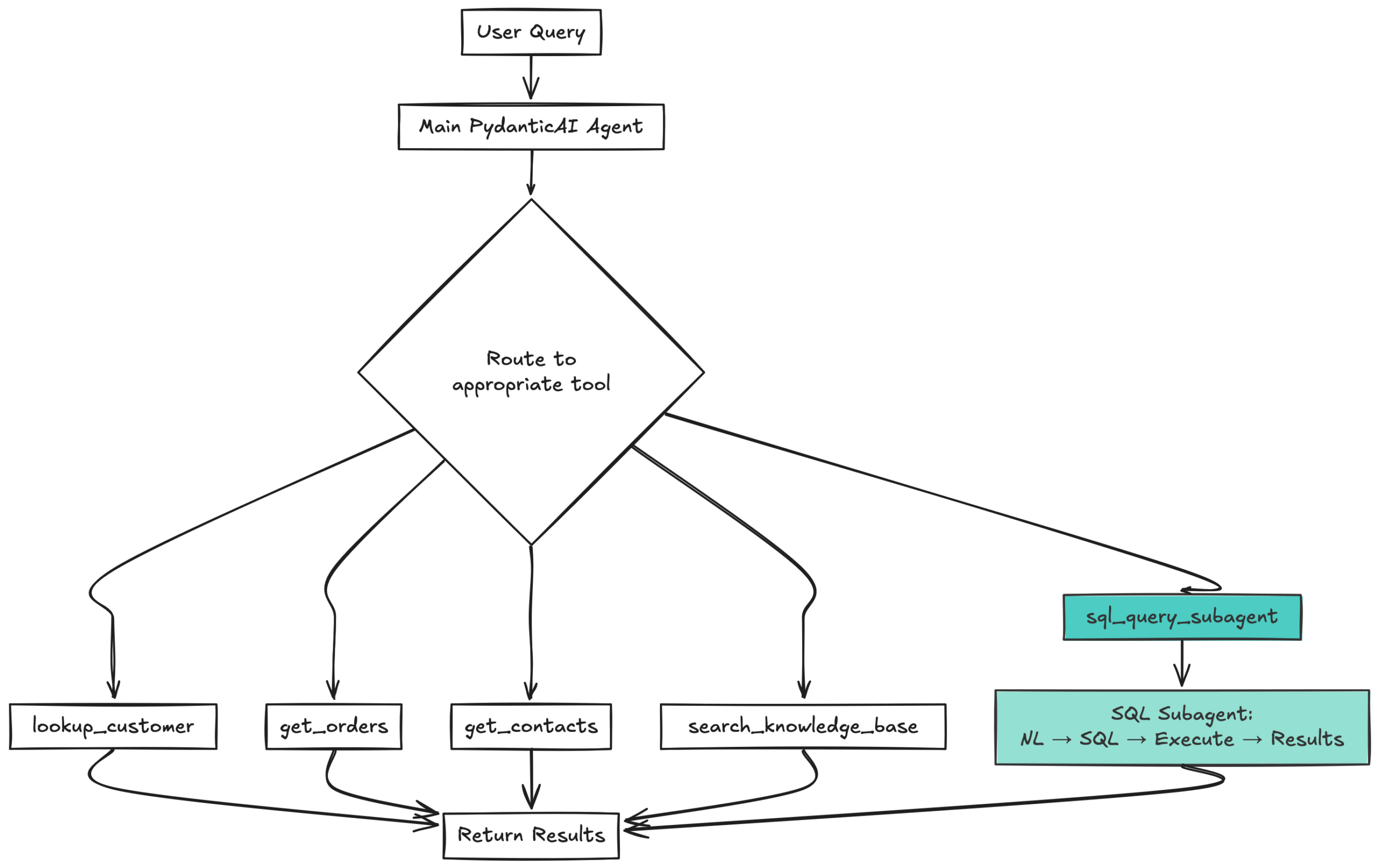
This diagram illustrates how a main PydanticAI agent intelligently routes each user query to the most appropriate backend tool or SQL subagent and then aggregates the results How the SQL Sub-agent works
The SQL sub-agent is itself a specialized PydanticAI agent with a focused mission: convert detailed natural language descriptions into safe, executable SQL queries. Here is what makes it powerful:
- Schema Awareness: Before generating any SQL, it fetches the complete database schema, understanding table structures, relationships, and data types
- Safety First: Every query is validated to ensure it is a
SELECTorWITHstatement only – no modifications allowed - Context-Rich Prompts: The main agent does not just pass on the user’s question. It enriches the query with context, filters, and specific requirements
- Transparent Results: Every response includes both the generated SQL and the results, making debugging and verification straightforward
How Agent Delegation solved the client’s problems:
This two-tier approach solved the original problems elegantly:
- Parallel Tool Calls: PydanticAI supports parallel tool execution. The main agent could call multiple tools simultaneously: looking up customers, checking orders, and fetching contacts all in one go. No more one-tool bottleneck.
- Coverage Without Complexity: We built specific tools for 80% of common cases (customer lookup, order status, contact information). The SQL subagent then handled the remaining 20% of edge cases and complex queries without requiring new tool development.
- Maintainable Codebase: Each tool did one thing well. The customer lookup tool only looked up customers. The order tool only fetched orders. When business logic changed, we knew exactly which tool to modify.
- Observability with Logfire: We integrated Pydantic Logfire from day one, giving the client complete visibility into what the agent was doing, which tools it called, and how long each operation took. This transparency built trust and made debugging a trivial process.
Example workflow
When a user asks “Show me open orders for Acme Corporation placed in the last 30 days,” the system would behave thusly:
- Main agent calls
lookup_customer_by_name("ABC")to get the customer ID - Simultaneously calls
sql_query_subagent("Find all open orders for customer with join_id X where OrderDate > date-30-days") - The SQL sub-agent generates and executes the appropriate query
- Main agent receives both results and synthesizes a coherent answer
The key improvement
PydanticAI’s parallel tool execution meant these operations happened simultaneously, not sequentially. What previously required two separate user interactions now completed in one.
This represented a significant improvement over the original single-tool system through sound architectural design. By combining specific tools with a flexible SQL fallback, we achieved both reliability and flexibility.
When a single agent was no longer enough
The PydanticAI agent with SQL sub-agent worked well for several months. The client was satisfied, and the system handled most queries accurately. But as we analyzed production logs and edge cases, a pattern emerged: the agent struggled with complex, multi-step queries that required precise orchestration.
New challenges:
The accuracy problem
While the SQL subagent was powerful, it operated as a single atomic operation. When given a complex request like “Find all open orders for ABC placed in the last 30 days with copper products,” the agent would:
- Receive the natural language query
- Fetch the entire database schema (473 columns across 15 views)
- Generate a single SQL query trying to handle everything at once
- Execute and return results
This worked for straightforward queries, but more complex queries revealed weaknesses:
- SQL generation errors: Complex queries involving multiple joins, filters, and aggregations were more likely to contain syntax errors or logical mistakes
- Schema confusion: With dozens of tables and hundreds of columns, the agent sometimes confused similar column names (ProductCategory vs ProductCode) or joined incorrect tables
- All-or-nothing execution: If any part of the query was wrong, the entire operation failed with no partial results
- Difficult debugging: When queries failed, it was hard to determine which part went wrong: was it the customer lookup? The date filtering? The product categorization?
The breaking point
When a user asked: “Show me orders for customer ABC, but only open orders from the last quarter, and only for products in the copper category.”
The SQL subagent generated a query that:
- Correctly found customer ABC
- Correctly filtered by date range
- But incorrectly joined the product category table, mixing up ProductCategory (internal classification) with ProductCode (user-facing part number)
The result was a technically valid SQL that executed successfully, but which returned incorrect or inaccurate data. The agent could not catch this error because it had no way to validate intermediate results. It was operating in a blind-one shot, all or nothing.
Another common failure pattern: a query like “Find customers with overdue invoices and email them a reminder” would generate an SQL that attempted to JOIN across multiple tables simultaneously: customers, invoices, payments, and contacts. With 473 columns across 15 database views, the agent frequently selected the wrong JOIN conditions or confused similar column names (CustomerID vs CustomerNumber, InvoiceDate vs DueDate). A single incorrect JOIN condition would cascade through the entire query, returning results which were as useful as garbage.
These scenarios pushed us toward the pydantic-graph.
New solution:
Multi-step queries demand multi-step execution
We realized the fundamental issue: complex queries should not be executed as a single monolithic operation. They should be broken into discrete, verifiable steps:
- Customer Identification: First, definitively find the customer and validate the result
- Order Retrieval: Fetch orders using the validated customer ID
- Filtering Logic: Apply date and status filters to the retrieved orders
- Product Categorization: Add product information, with validation at each join
- Result Validation: Check that each step produced sensible results before proceeding
With the pydantic-graph, we could restructure the SQL operations into a workflow where each node performs one focused operation, validates its results, and passes clean data to the next step. If customer lookup fails, the workflow stops there, as there is no need to attempt order retrieval. If date filtering produces zero results, the agent asks for clarification before proceeding.
Why graphs handle workflow better than agents
This breakthrough was not just about breaking queries into steps: it was about separating what to do (orchestration logic) from how to reason (agent intelligence).
In the single-agent approach, the agent had to:
- Decide which tools to call
- Manage states between tool calls
- Handle errors and retries
- Determine when to parallelize operations
- Synthesize the final results
That is simply too many responsibilities. The agent spent cognitive capacity on workflow management when it should be focused on reasoning on data and generating accurate queries.
With the pydantic-graph, we inverted this approach and separated the operations thus:
- Graph handles: Step sequencing, state management, error propagation, parallel execution
- Agent handles: Intent analysis, query generation, result synthesis, natural language understanding
This separation dramatically improved accuracy. The SQL generation agent no longer needed to think about “what comes next,” it just focused on generating the best SQL for its specific step while the graph ensured steps were executed in the right order with validated data flowing between them.
Vstorm’s Solution: Orchestrating multi-step workflows with Pydantic-Graph
After evaluating several approaches, we chose the pydantic-graph, a type-safe finite state machine library that integrates seamlessly with PydanticAI. What made it compelling was not just its features, it was its philosophy.
What is pydantic-graph?
Pydantic-graph is a library for building and running finite state machines in Python. It does not depend on Pydantic AI and can be used standalone, but when combined with PydanticAI agents, it creates a powerful hybrid architecture:
- Graph handles workflow orchestration, state management, and controls flow
- Agents handle reasoning, language understanding, and decision-making
Under the hood, every PydanticAI agent is already using pydantic-graph to manage its execution flow. We were simply making that pattern explicit at the application level.
The Hybrid Agent Architecture
The pydantic-graph integration transformed how the SQL subagent operates internally, while the main agent architecture remained clean and tool-focused. Here is how it works:
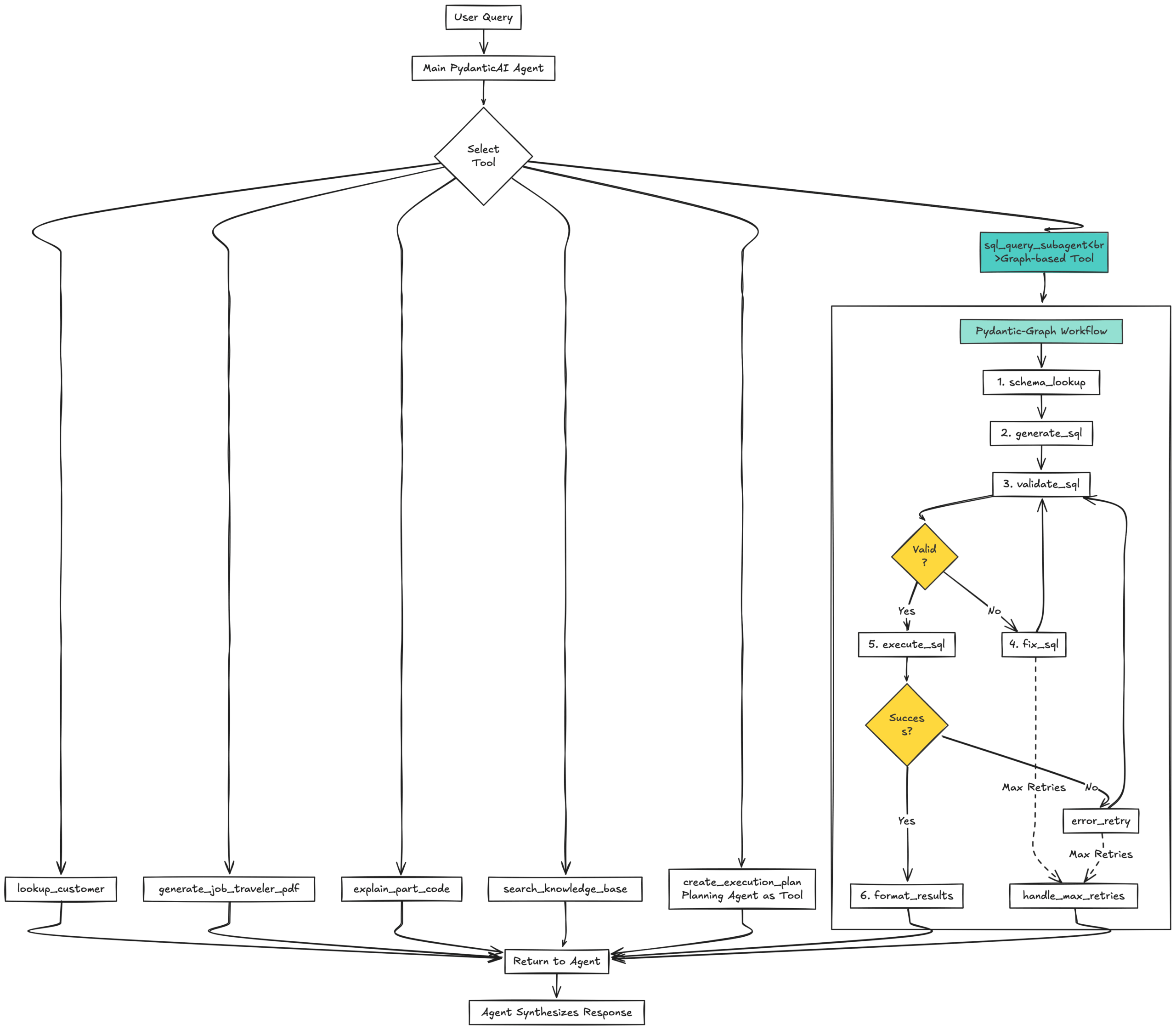
This diagram shows how a main PydanticAI agent routes user queries to multiple specialized tools and a graph-based SQL subagent, then synthesizes the combined results into a final answer Agent-as-tool pattern
The key architectural insight: complex workflows can be packaged as tools that the main agent calls. The main agent does not need to know about the internal complexity: it just knows “when the user asks about complex SQL queries, call the sql_query_subagent tool.”
This “agent-as-tool” pattern appears in two places:
- Planning Agent-as-Tool (
create_execution_plan): When queries are complex or ambiguous, the main agent can call the planning agent to get a structured execution plan. The planning agent is itself a PydanticAI agent, but from the main agent’s perspective, it is just another tool. - SQL Sub-agent as Graph-based Tool (
sql_query_subagent): The SQL sub-agent is now implemented as a pydantic-graph workflow with discrete steps (schema lookup, SQL generation, validation, fixing, execution). But the main agent calls it like any other tool: it just passes the user query and gets back formatted results.
Inside the SQL sub-agent graph
The pydantic-graph workflow for SQL queries includes eight discrete steps:
- Schema_lookup: Fetches complete database schema for context
- Generate_sql: LLM generates SQL query using schema and user intent
- Validate_sql: Checks for syntax errors, dangerous keywords (DROP, DELETE, etc.), missing table prefixes, and structural issues
- Fix_sql: If validation fails, LLM receives specific error messages and regenerates the query (max 2 retries)
- Execute_sql: Executes the validated query against the database
- Error_retry: If execution fails (e.g., column doesn’t exist), LLM receives an error message and regenerates with corrections (max 2 retries)
- Format_results: Formats successful results; automatically exports to CSV for datasets >1000 rows with temporary download link
- Handle_max_retries: Returns helpful error message if retries exceeded, suggesting what went wrong and how to fix it
Each step is a focused operation with clear inputs and outputs. If validation fails, the graph automatically routes to the fix step. If execution fails, it routes to error retry. The SQL generation agent does not think about this flow, it just generates the best SQL it can for the current context. The graph handles all orchestration, routing, and state management.
The retry mechanism is particularly clever: the state tracks
retry_count, incrementing on each fix attempt. After 2 validation failures or 2 execution failures, the graph exits tohandle_max_retries, which returns a detailed error message explaining what went wrong, preventing infinite loops while still being helpful to users.Example: SQL query with validation and retry
Let us trace through the query of “Show me orders for customer ABC from last quarter with copper products”:
- Main Agent receives the query and recognizes it requires custom SQL (no specific tool covers this combination)
- Main Agent calls
sql_query_subagent(user_query="Find all orders for customer ABC from last quarter with ProductCategory containing 'copper'") - SQL sub-agent graph executes:
- Schema_lookup: Fetches complete database schema
- Generate_sql: LLM generates SQL query with customer lookup, date filtering, and product category join
- Validate_sql: Checks query structure-passes validation
- Execute_sql: Executes query but encounters error (column name typo: “ProductCategoy” instead of “ProductCategory”)
- Error_retry: LLM receives execution error, analyzes it, generates corrected SQL
- Validate_sql (retry): Validates corrected query-passes
- Execute_sql (retry): Successfully executes corrected query
- Format_results: Returns formatted results with SQL shown for transparency
- Main Agent receives formatted results and synthesizes natural language response
The graph handles all the retry logic, error handling, and state management. The main agent just sees a tool that reliably returns results. If the query fails validation twice or execution fails twice, the graph returns a helpful error message explaining what went wrong.
The Hybrid Approach: best of both worlds
The key insight that made this architecture successful: agents and graphs complement each other perfectly when used for their strengths.
When to Use Graphs
Use graph nodes for operations that are:
- Deterministic: Customer lookup, data filtering, PDF generation
- Testable: Each node can be unit tested independently
- Performance-critical: Parallel execution is explicit and optimized
- State-dependent: Workflow needs to track and update state across steps
When to Use Agents
Use agents for operations that require:
- Natural language understanding: Intent analysis, query interpretation
- Reasoning and judgment: Should we include this data? Which format is appropriate?
- Synthesis: Combining multiple data sources into coherent natural language
- Flexibility: Handling edge cases that don’t fit deterministic rules
State Management Done Right
One of pydantic-graph’s killer features is strongly-typed state objects. In the SQL sub-agent, the
SQLQueryStatedataclass tracks everything, including:- User query and export preferences
- Schema context fetched (473 columns across 15 views)
- Generated SQL (updated as it is fixed through retries)
- Validation errors encountered
- Query results (both formatted and raw)
- Retry count for circuit-breaking (prevents infinite loops)
- CSV export URLs (for large datasets)
This state flows through the entire graph. Each node reads what it needs from state, performs its operation, and updates the state for downstream nodes. Because it is a dataclass (or Pydantic model), you get type safety, IDE autocomplete, and automatic validation.
The benefits are immediate:
- Debugging: Inspect state after any node to see exactly what data was available
- Testing: Initialize state with specific values and test individual nodes in isolation
- Monitoring: Track state changes through Logfire to understand execution flow
- Retry Logic: State tracks retry count, preventing infinite loops
Note on Architecture Classification
While this system uses multiple AI agents (main agent, SQL sub-agent, planning agent), it is important to clarify that this is not a multi-agent orchestration system in the traditional sense, where autonomous agents dynamically negotiate and coordinate with each other.
Instead, this is a hierarchical delegation pattern where:
- The main agent acts as the orchestrator and decision-maker
- Sub-agents are invoked as specialized tools (the “agent-as-tool” pattern)
- The graph handles deterministic workflow orchestration
- There is no peer-to-peer agent collaboration or dynamic negotiation
This architecture combines:
- Single primary agent for user interaction and high-level reasoning
- Specialized subagents for domain-specific tasks (SQL generation, planning, part codes)
- Graph-based workflows for complex multi-step operations requiring validation and state management
This hybrid approach provides the benefits of specialization without the unnecessary complexity of true multi-agent systems where agents must autonomously coordinate and negotiate.
Extending the system: advanced features and integrations
While the agent-to-graph evolution solved the fundamental accuracy and orchestration challenges our client was facing, the system includes several additional capabilities that enhance its practical value:
- Advanced RAG for Knowledge Search: Company procedures and policies are searchable through a RAG system with query expansion, LLM reranking, and source attribution. Results include PDF download links and relevance scores.
- Document Generation: The system generates branded PDF documents and exports large datasets to CSV files stored in Azure Blob Storage with temporary download links.
- Multi-Modal Support: Both text and image content from the knowledge base are indexed and searchable, enabling queries that return both explanations and visual references.
- Chart and Visualization: Analytical queries can trigger chart generation using matplotlib, with results uploaded to blob storage and embedded in responses.
These features leverage the same pydantic-graph orchestration with each implemented as a node or workflow that can be composed of other operations. The graph architecture made adding these capabilities straightforward since each could be developed and tested independently before integration.
Lessons learned: when to use what
After months of production use, clear patterns emerged about when to use each approach. The content converted into a markdown table can be found below:
Approach When to Use Simple PydanticAI Agent • Queries are straightforward (single customer lookup, simple order status)
• Tool calls are independent (no sequential dependencies)
• Real-time response is critical (graph adds minimal overhead, but it exists)
• The workflow is obvious and unchangingPydantic-Graph Workflows • Multi-step processes with dependencies (lookup, then filter, then generate)
• Parallel execution matters (generate PDFs for 20 orders simultaneously)
• State management is complex (tracking multiple pieces of data across steps)
• Workflows need to be resumable or checkpointed
• Testing and debugging benefit from isolation (test each node independently)Vstorm’s Impact
Before (simple agent – single LLM call):
The original implementation used a single agent call:
- Fetch database schema and include it in the system prompt
- Generate SQL in one shot with the LLM
- Execute without validation
- If it fails, retry the entire process with full schema context
Problems:
- No validation before execution (database errors only after running)
- If SQL failed, had to retry entire process with full schema context
- No structured error recovery – just hope the user rephrases
- Failed queries waste tokens and time
After (graph workflow – 8-step pipeline):
The graph-based implementation breaks the process into discrete steps:
- Schema Lookup: Fetch database schema (cached, reusable)
- Generate SQL: LLM generates SQL with schema context
- Validate SQL: Check syntax, security, structure (before execution)
- Fix SQL: If validation fails, LLM fixes with error context (max 2 retries)
- Execute SQL: Run the validated query
- Error Retry: If execution fails, LLM fixes with execution error (max 2 retries)
- Format Results: Format and return results
- Handle Max Retries: Return helpful error if retries exceeded
Benefits:
- Validation catches errors before execution (saves wasted DB calls)
- Automatic error fixing with LLM (max 2 retries per stage)
- Each step is testable and observable (Logfire shows exact execution path)
- Circuit breaker prevents infinite loops (retry_count tracking)
- State tracking enables debugging (“SQL failed at validation stage with error X”)
When graph orchestration makes sense:
- You need robust validation and error recovery (like SQL generation)
- Multi-step workflows with clear dependencies
- Operations where partial failure is expensive
- Workflows that benefit from intermediate state inspection
When to stick with simple agents:
- Single-shot operations (explain a concept, translate text)
- Operations where failures are cheap to retry
- Real-time interactions where latency matters most
- Workflows with no branching or conditional logic
Key takeaways and production success
The journey from a single OpenAI function-calling agent to a sophisticated pydantic-graph orchestration system taught us that there is no one-size-fits-all solution in agentic AI. The right architecture depends on your specific requirements.
The client, who started with a failing proof of concept, now has a production system handling thousands of queries each day. Their manufacturing team gets instant answers to complex questions about orders, inventory, and customers. The system scales as their business grows and new features take days to implement, not months.
The LLM Book
The LLM Book explores the world of Artificial Intelligence and Large Language Models, examining their capabilities, technology, and adaptation.